How does your Google page look like? Mine is customised with iGoogle.
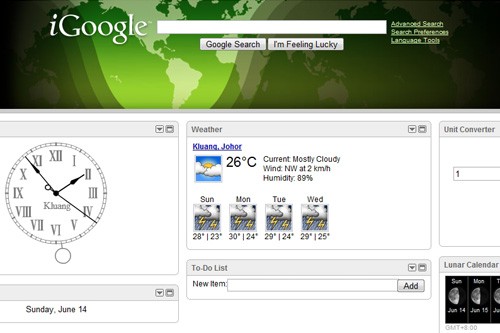
I would like to share with you what are the theme and gadgets added to my iGoogle. First, I am using the Earth-light theme. This theme can track the light of the sun on the earth as it changes throughout the day. Means I can see which part of the earth is daytime and which part is night time. Great theme indeed.
The first gadget is a pendulum clock. There is a chime every quarterly hour. And there are “dong dong” sounds every hour (sounds spooky in the middle of the night). Below it is a mini calendar which I can easily glance to check the date.
Next, there is a “weather forecast” for Kluang town for 4 continuous days. It shows the high-low temperatures and also the humidity of the days (I like thermometers). Below it is a “to-do” list. Can keep track of the important things I need to do.
At the last column, I installed a unit converter. Next time I do not need to hunt high and low for a ruler whenever I need to convert inches into centimetres. Just go to iGoogle and everything is there. Can change mass, volume, area, temperature.. etc. Very handy. Lastly there is a moon graph below the converter. Can check how big is the moon for the whole week.
Very interesting, right? Go customise your iGoogle now.

by xin, on June 15 2009 @ 3:28 pm
good one. so handy. will go home n try 🙂